
Local SEO blog
My Namecheap Domain Review After 10 Years
September 4, 2026

By Randi Bagley, updated September 4, 2026
Disclosure: This post contains affiliate links. If you purchase through my link, I may earn a commission at no extra cost to you. All opinions are my own, based on about 10 years of actual use.
I registered my first domain in 2013.
At the time, I was working as a tow truck dispatcher and teaching myself SEO between calls. I had discovered the whole “make money with a blog” corner of the internet and was trying to understand how websites, keywords, hosting, and domain names fit together.
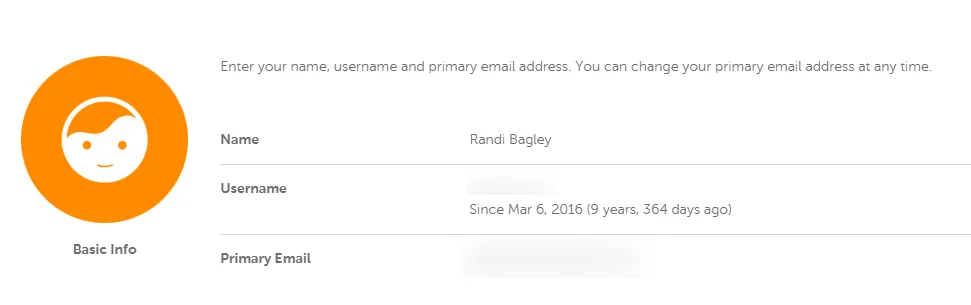
I bought my first .com through Namecheap in 2016.
Ten years later, I still manage multiple domains there. I have used Namecheap for domain registration, renewals, privacy protection, DNS management, auto-renewal, SSL, and shared hosting.
I have also used GoDaddy, Bluehost, and several other hosting companies and registrars.
Namecheap is the one I kept.
That does not make it perfect. It does make it useful enough that I rarely think about moving my domains somewhere else. For a registrar, boring reliability is a pretty good compliment.
Why I moved to Namecheap
GoDaddy was the name everybody knew when I started buying domains.
It also felt like every checkout involved dodging another offer. Website security. Email. More privacy. Another package. A mysterious bundle that looked helpful until the price appeared.
I prefer a cleaner buying process.
Namecheap’s dashboard felt easier to understand, and the checkout experience had fewer aggressive upsells. That mattered when I was buying domains for side projects, client experiments, and websites I was building while figuring out my career.

The other big draw was free privacy protection for eligible domains.
Namecheap currently says Domain Privacy is included with eligible registrations, renewals, transfers, and reactivations. The service is added automatically and enabled by default. Some domain extensions have registry restrictions, so I always check the specific extension before buying.
You can read the current details on Namecheap’s official Domain Privacy support page.
Domain registration and renewal pricing
The first-year price is only part of the decision.
Domain registrars commonly offer introductory pricing for new registrations. Renewal pricing is higher. Namecheap does this too, and the difference depends on the domain extension, current promotion, and registration term.
A discounted first year can look extremely cheap in a search result. The renewal price is the number that belongs in your long-term budget.
I recommend checking both prices before you complete the purchase. Namecheap lists current TLD pricing on its domain registration page, and the cart should show the amount you are agreeing to pay.
The price can also include small registry or ICANN-related charges, depending on the transaction. The checkout total is the number that matters.
My practical advice is simple. Buy a domain because you have a real use for it, then budget for the regular renewal cost. If you are managing several domains, set a calendar reminder and review the list once or twice a year.
That prevents the classic domain hoarder problem where you discover you are paying for twelve abandoned ideas from 2018.
I have several of those ideas.
Free privacy protection matters
When you register a domain, registration information can be connected to the domain record.
Without privacy protection, personal contact details may be exposed through registration lookup systems. That can lead to spam, sales emails, fake renewal notices, and other internet nonsense.
Namecheap’s privacy protection keeps eligible domain registration details private.
I consider that a standard feature now. It is one of the reasons I continue to like Namecheap for small businesses, freelancers, bloggers, and people setting up their first website.
Privacy availability depends on the TLD. Some country-code extensions and specialty domains follow different rules. Check the extension before purchasing instead of assuming every domain receives the same protection.

DNS management is straightforward
DNS is the part of a website setup that makes people stare at the screen and whisper, “I probably should have written this down.”
It controls where a domain points.
You may need to add an A record for hosting, a CNAME record for a third-party service, MX records for email, or verification records for Google Search Console and other platforms.
I manage those records through Namecheap regularly. The dashboard is functional and easy enough to navigate once you understand what each record does.
Namecheap also offers FreeDNS, which can be useful when you want to manage DNS separately from your hosting setup.
I appreciate having direct access to the records. I do not need to open a support ticket every time I want to point a subdomain somewhere or verify a service.
That kind of control saves time, especially when you manage several websites.
My experience with Stellar shared hosting
I have hosted several smaller websites on Namecheap’s Stellar shared hosting.
That includes this site, randibagley.com, which has run on a Stellar package.
Shared hosting works by putting multiple websites on the same server environment. It keeps costs reasonable, and it is usually enough for a personal blog, portfolio, small business site, or early-stage project.
It has limits.
High-traffic websites, large e-commerce stores, resource-heavy applications, and sites with complicated server requirements may outgrow shared hosting. When that happens, you may need a stronger hosting plan, a managed WordPress service, a virtual private server, or another hosting provider.
My Stellar experience has been suitable for the smaller sites I have hosted there. I would not choose a basic shared hosting plan automatically for a high-volume store or a site expecting a major traffic spike.
Hosting promotions also have renewal pricing. Check the term, introductory amount, renewal amount, storage limits, and included features before you buy.
Namecheap’s current shared hosting page has the plan details. Those details can change, so I am avoiding the exact plan limits from my old review.

WordPress options and SSL
I have used traditional shared hosting for WordPress sites.
Namecheap also offers EasyWP, its managed WordPress hosting product. Managed WordPress hosting can simplify parts of setup and maintenance, though the right choice depends on your traffic, plugins, technical needs, and budget.
I have used Namecheap hosting and WordPress setups, but I have not personally tested every EasyWP tier. I will not pretend I have a decade of hands-on experience with products I have only reviewed from the outside.
You can check the current EasyWP plans directly.
I have also used Namecheap’s SSL setup on hosted sites. HTTPS is basic website maintenance now. Browsers warn visitors about insecure pages, and a site without SSL creates an avoidable trust problem.
The exact SSL details can depend on the hosting product and current plan terms. Read the current inclusions before assuming a certificate or renewal is covered forever.
Email forwarding works better for me
Namecheap offers private email products for people who want an address at their own domain.
I have used domain email setups, but I do not usually buy Namecheap’s private email service for my own projects. I prefer creating forwarding addresses and sending them to Gmail accounts I already use.
For example, I may create an address at a domain and forward it to my main inbox. That keeps the public-facing address professional without giving me another mailbox to check.
The setup can feel less polished than a full business email system, and forwarding is not the right solution for every company. A team that needs shared mailboxes, calendar tools, administrative controls, or reliable outbound delivery should choose an email platform built for that job.
For my personal sites and smaller projects, forwarding has been enough.

Customer support uses chat and email
Namecheap does not currently offer phone support.
According to its official support documentation, support is available through 24/7 live chat and email.
That setup works well for me because I prefer written support conversations. I can save the transcript, copy technical details, and review the steps later instead of trying to remember a phone call while also changing DNS records.
My support experiences have generally been useful. I have received help with account questions, domain settings, and technical issues.
Support quality can vary depending on the problem. DNS problems sometimes require careful explanation and escalation. That is common across hosting companies. A support agent cannot magically fix a third-party service that has the wrong record configured.
People who require phone support should know that Namecheap will not meet that preference.
What I like about Namecheap
- Straightforward domain management
- Free privacy protection for eligible domains
- Easy access to DNS records
- Auto-renewal controls
- Shared hosting that works for smaller sites
- Live chat and email support available around the clock
- Fewer aggressive checkout upsells than some registrars I have used
- One account for managing multiple domains
- Hosting, domain, and WordPress options in the same ecosystem
What I do not love
- No phone support
- Introductory pricing differs from renewal pricing
- Shared hosting has resource limits
- Some domain extensions have different privacy rules
- The dashboard is functional more than beautiful
- Email forwarding may require more setup than a full business email platform
- High-traffic or technically complex sites may need stronger hosting
Those tradeoffs are manageable for the type of sites I usually host there.
Who should use Namecheap
Namecheap is a good fit for freelancers, bloggers, small business owners, portfolio sites, and people buying domains for the first time.
It also works well for people who manage multiple domains and want a central dashboard without paying extra for basic privacy on eligible extensions.
Shared hosting makes sense for smaller websites with normal traffic and straightforward needs. A growing online store, busy publication, membership platform, or application may need a more powerful setup.
Companies that need phone support should look elsewhere.
Companies that need enterprise hosting should also compare other providers before choosing a plan.
My final recommendation
After about 10 years, I still recommend Namecheap for domain registration.
I like the practical parts. The dashboard is familiar. DNS management is accessible. Privacy protection is included on eligible domains. Auto-renewal helps prevent accidental expiration. The hosting has worked for my smaller sites, including this one.
I also appreciate that I can buy a domain without fighting through a maze of add-ons.
Namecheap has limits, and the renewal price deserves attention. Shared hosting is not a universal answer. No phone support will bother some customers. Those details belong in the decision.
For my own work, Namecheap has been reliable enough to keep using. A domain registrar should quietly handle the domain while I focus on building the site, publishing content, and feeding the algorithm.
That is exactly what I want from it.
I started learning SEO in 2013 with more curiosity than technical knowledge. Ten years of using the same registrar has given me plenty of time to test the boring stuff that matters.
Namecheap keeps passing that test.
If you are building a site and want to compare the domain and hosting options yourself, start with Namecheap’s current domain pricing and check the renewal cost before you commit.
For more about the work I do with websites, search visibility, and technical cleanup, visit my SEO services.